Getting Started
Selecting a Community
One LUX CAD serves many roleplay communities, each with its own characters, records and staff. The community picker is where you choose which one you are working in right now.
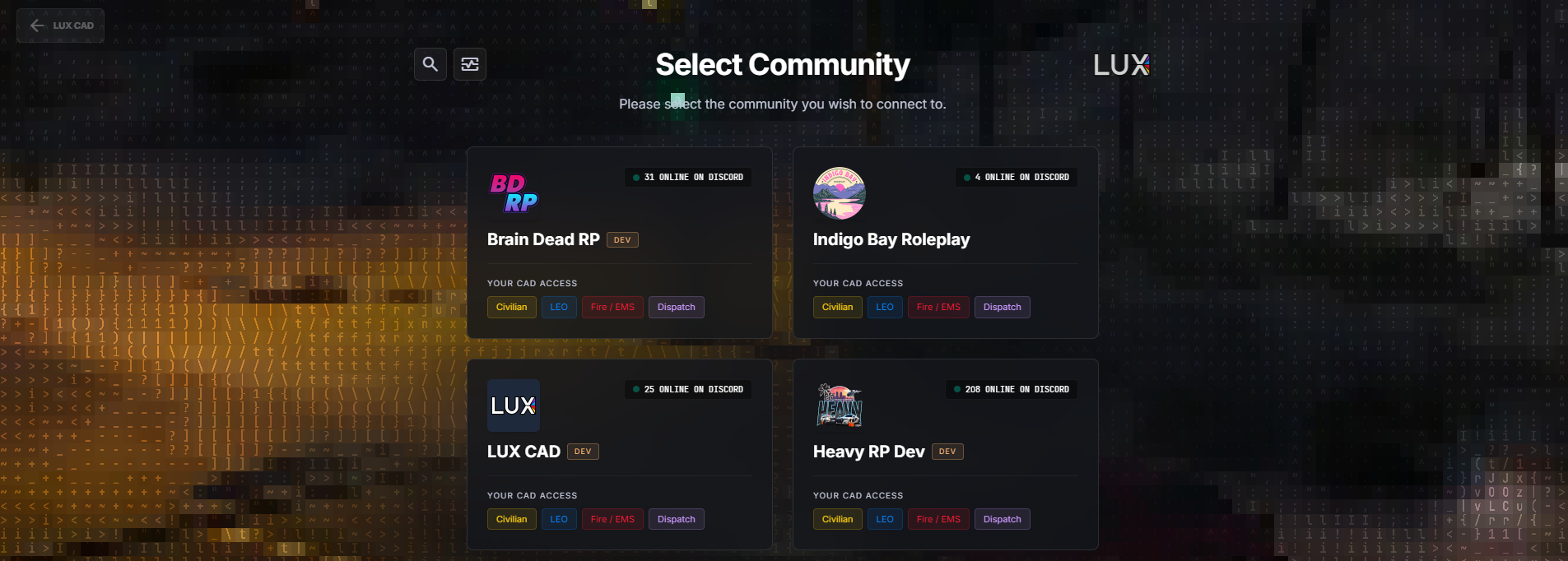
How the list is built
There is no membership list to be added to. LUX CAD asks Discord which servers you are in and shows a card for every one of them that runs a LUX CAD community and where you have at least civilian access.
Join a community's Discord and the card appears by itself. Leave it and the card disappears just as quietly.
Reading a card
| On the card | Means |
|---|---|
| Logo and name | the community — the logo comes from its Discord server |
| … ONLINE ON DISCORD | how many members are online in that Discord right now |
| DEV | a development network, not the live one — used for testing |
| Your CAD Access | the departments you may open: Civilian, LEO, Fire / EMS, Dispatch |
The access badges are your current Discord roles, resolved the moment the page loads. If you expect a badge that is not there, the role is missing in that community's Discord — ask their staff team, not LUX support.
Picking one
Click the card. The community stays selected for 24 hours or until you pick another one, and you land on the department portal — see Choosing Your Department.
To switch later, use SWITCH COMMUNITY at the top left of the portal. You do not have to sign out.
Messages you may run into
- "No registered networks detected." — you are not in a Discord server that runs LUX CAD. Join the community's Discord first.
- "Sign-in provider unreachable — showing your last known networks." — Discord is having trouble. Your communities still appear, from the last known list, but only the Civilian badge shows until Discord recovers. That is a deliberate safety limit, not a lost role.
- "Subscription suspended" on a greyed-out card — the community's LUX CAD subscription is on hold, so nobody can open the CAD there right now. Only the community owner can restore it; let their staff team know.
Your own networks
Two extra blocks can appear underneath, depending on who you are:
- Your Networks Needing Attention — communities you own that are switched off (Deactivated) or whose subscription is on hold (Subscription suspended). MANAGE opens their admin dashboard, where you can reactivate them or restore the subscription under Billing.
- Deploy your LUX CAD network — for community owners with access to set up their own tenant. Deploying is invite-only during the pilot; everyone else sees an invitation to join the LUX CAD Discord instead.
In the game
The in-game tablet skips this screen entirely. It always belongs to the server you are playing on, so there is nothing to choose and no way to switch.