Dispatch
Active Units & Assignment
The units panel is the list of everyone on duty, and it is where you decide who goes to what.
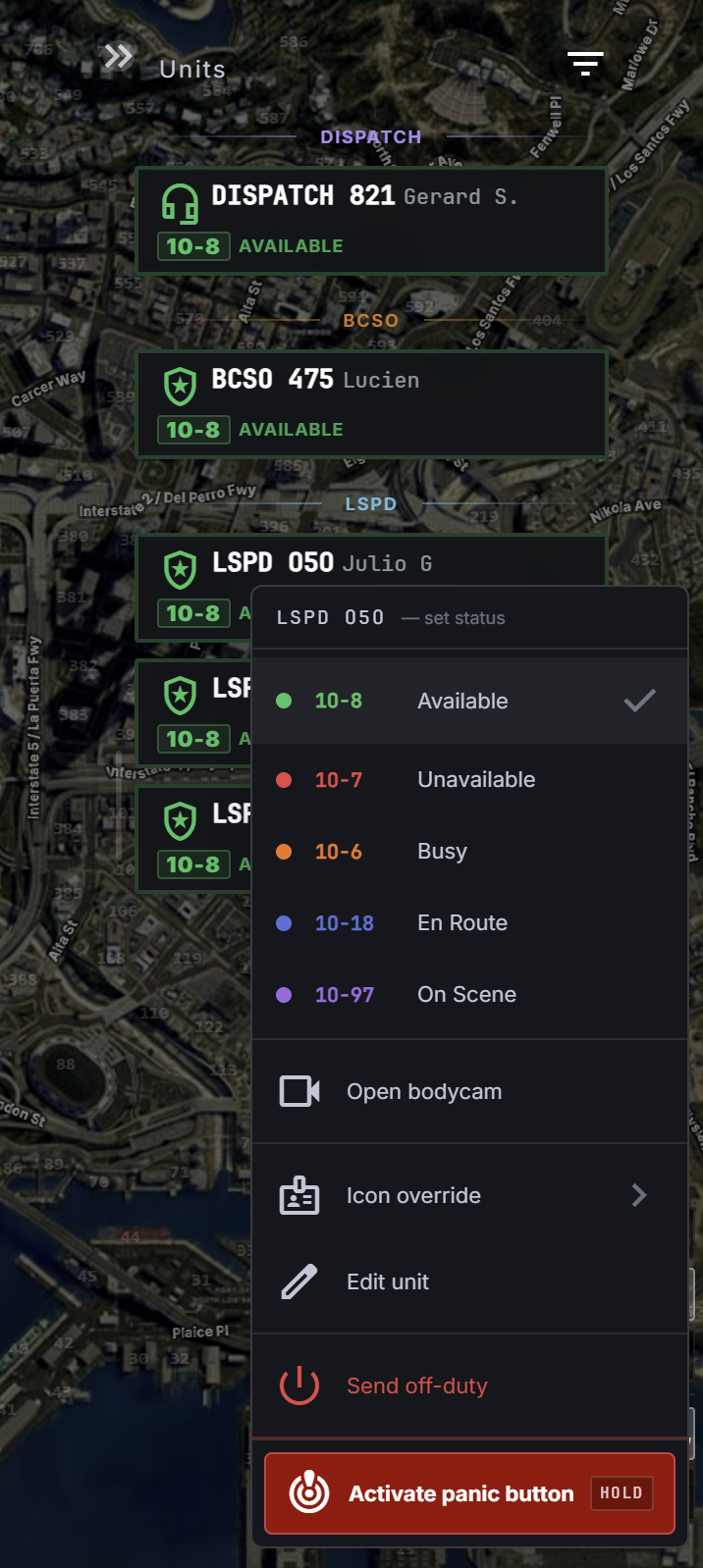
Reading the list
Units are grouped by agency — a header per agency, then its units. Each row carries the callsign, the name of whoever is behind it, and the status code with its colour. The colours are your community's own, set per status code, so what "available" looks like is a local decision.
Three things light a unit up on their own:
- Speaking on the radio — you can see who is keying up.
- A panic alarm — the unit that fired it is marked.
- Attached to a call — which call, so you are not guessing.
You can switch between the card view and a denser list view, and filter the list on the Incidents pages of staff shells. Both choices are remembered.
Assigning
ASSIGN UNIT on a call opens the unit picker. It puts Available units at the top, sorted by how close they are to the call — so the unit at the top of that list is genuinely the nearest free one, not the first alphabetically. Everything else is grouped underneath.
You can also assign straight from the map by dragging a unit onto a call.
Assigning sets the unit en route and puts the call on their terminal. Arriving sets them on scene.
In Station Mode SAFR is grouped per station. People in quarters are small number chips, and an apparatus nobody is aboard yet is a dashed card marked READY or COMMITTED. You assign the apparatus, not the person: that tones out its crew. After a call a SAFR apparatus shows RETURNING instead of available. See Station Mode.
The unit menu
Right-click a unit for the things you do to a unit rather than to a call:
| Action | Does |
|---|---|
| Set status | override their 10-code from your side |
| Open bodycam | open that unit's camera in a floating panel |
| Icon override | change the icon they show on the map — K9, air, detective |
| Edit unit | correct their callsign or details |
| Disband unit | split every member out into their own solo unit — only on a unit with more than one member |
| Send off-duty | sign that unit off |
| Activate panic button | fire their panic alarm on their behalf — hold to confirm |
Setting a status for someone is a real dispatch tool, not an override to be shy about — a unit that forgot to clear is a unit the queue thinks is busy. But it is their status: fix it because you know what they are doing, not to make the board look tidy.
Activate panic button is a hold, not a click, exactly like the officer's own panic button. It pulls every unit in the city off what they are doing, so it asks you to mean it. Use it when a unit is in trouble and cannot reach their own — that is the case it exists for.
Multi-member units
Units can carry more than one member — two officers in a car under one callsign. Disband unit breaks that apart into solo units, which is what you want when a crew splits up on scene.
Member order inside a unit matters: it decides which bodycam opens and who you are acting on. The list keeps them in callsign order rather than an arbitrary one.
Going off duty
A unit that leaves the game, or gets signed off, disappears from this list on its own. You do not have to clean up after them — and if a callsign is still here, somebody is still on it.