Dispatch
Pursuits
A pursuit panel gives the chase a structure everyone can see: one primary unit, a list of backups, and the timers your community uses to decide when a PIT or spikes come into play. Dispatch usually ends up running it, because the primary is busy driving.
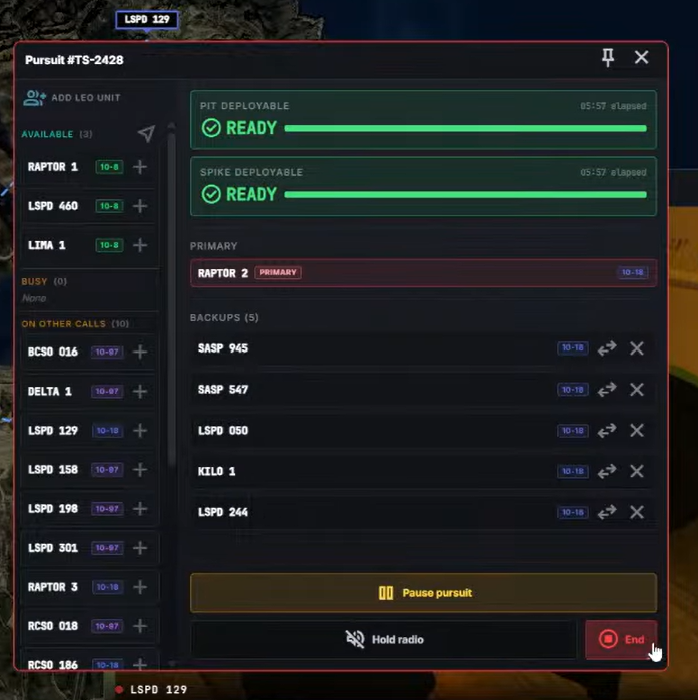
The panel
Left — units you can add. Every LEO unit, grouped by available, busy, on another call, or unavailable. The available ones are sorted by how close they are to the primary, and re-sorted every few seconds — so the top of that list is the unit who can actually get there, not the first alphabetically.
Right — the pursuit. The PIT and spike timers counting down, the elapsed time beside them, the primary, the backups, and the controls.
The timers
PIT and spike count down to the moment those tactics become available, on intervals your community sets. They are a shared clock, not permission: what is allowed is your community's policy. The timer only makes sure everyone is reading the same number instead of arguing over how long this has been running. A tone plays when one expires.
Primary and backups
The primary is the unit calling the pursuit. Add backups from the left; promote one with Make primary .
If the primary drops out — a crash, a closed browser, signed off by someone else — the pursuit does not end. The longest-serving backup is promoted automatically and a notice appears saying who took over. Confirm it, or pick someone else.
That notice never clears itself. It waits for a person, because the dispatcher who needed to see it was probably typing something else when it happened.
Pause and hold
Pause freezes the timers, keeps the units attached, and stops the GPS trail in-game until you resume. For a genuine stop — lost visual, a stand-off — not to buy time on a PIT clock.
Hold radio clears the channel so pursuit traffic is not talked over. It is the same switch as the hold in the radio panel.
Ending it
End pursuit closes it and records where it finished.
That is the only way to end one. The × on the panel minimizes it to the dock rather than closing it — deliberately, so a running pursuit cannot vanish because somebody tidied their screen.
On ending the pursuit, the primary's current location becomes the location of the incident the pursuit was initiated from or is linked to.