Dispatch
The Dispatch Console
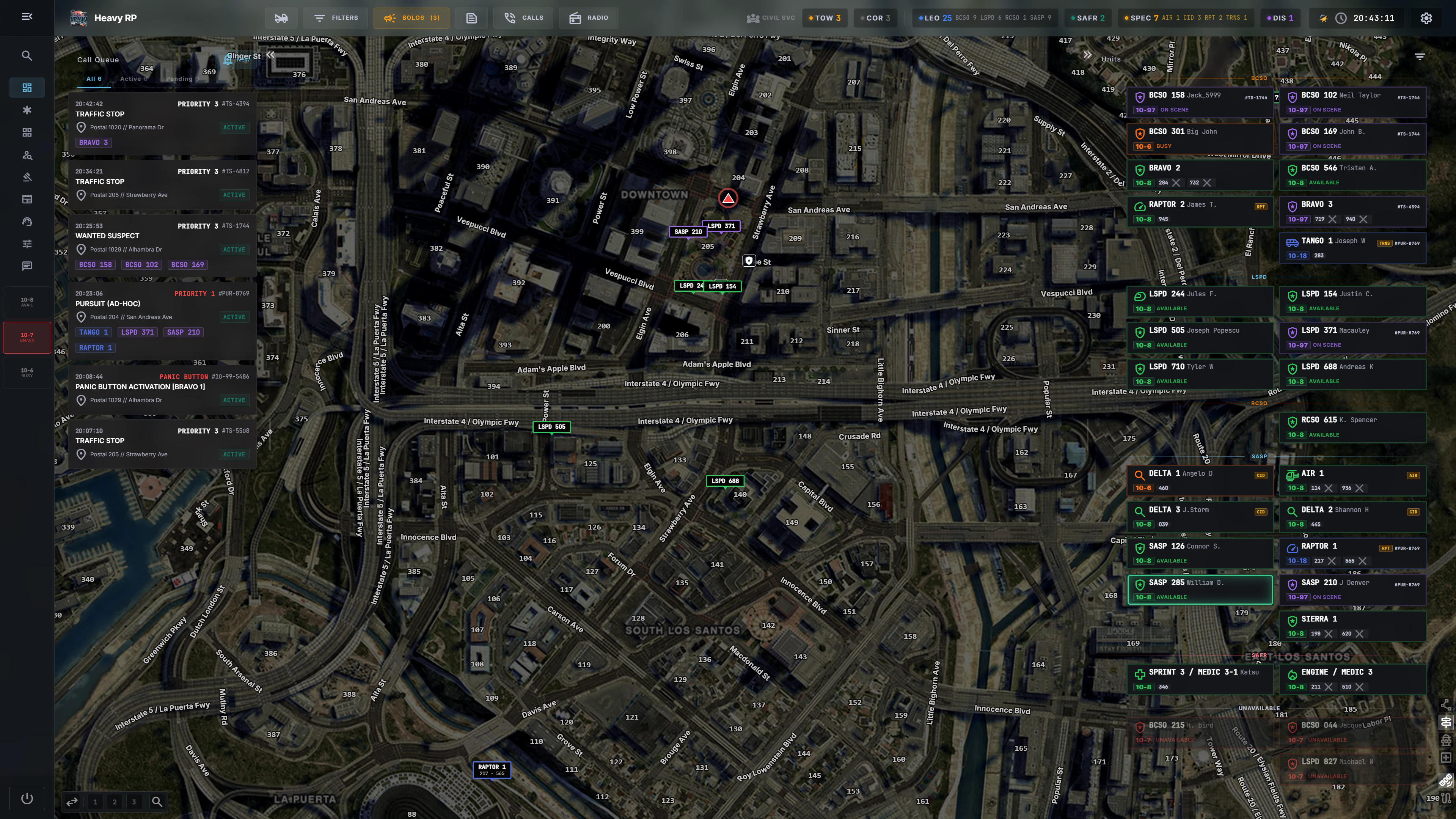
Dispatch is the only seat in the CAD that sees everything at once: every call waiting, every unit on duty, the whole map, and the radio. It is also the only role that works from a desk rather than from a car, and the console is built around that.
Signing on
Dispatch has its own sign-on: the department is fixed, you pick a Dispatch
Number / Name behind the DISPATCH prefix — 110 gives DISPATCH 110 — plus
your name if you want. Full detail in
Going On Duty.
The three panels
| Panel | What it is for |
|---|---|
| Call queue | everything waiting or running — see Call Queue & 911 |
| Active units | who is on duty, their status, what they are on — see Active Units |
| Map | where everyone actually is — see The Map & GPS |
The gutters either side of the map collapse, so you can give the map the screen when a pursuit is running and take it back when the queue fills up.
The sidebar
Command Center · Incidents · Body Cam Feeds · Database · Warrants · News · Request Services, plus two things that are not pages:
- Server Controls — a pop-out with the runtime switches, and an amber dot when one of them is off. See Server Controls.
- Messages — unit-to-unit messaging, with a red badge for unread.
At the bottom sit your own 10-code status buttons and GO OFF-DUTY. You are a unit like any other: dispatch shows up in the fleet, and your status is what tells the city whether the console is staffed.
The topbar
Unit counts per department, the civilian-services presence counters (see Civilian Services Presence), and the clock on community time.
Things that appear over the console
Three layers arrive on their own and sit above whatever you are doing:
- Panic alarms as a red banner stack at the top. See Panic Alarms.
- Incoming 911 calls, which ring.
- Pursuits, as a floating panel. See Pursuits.
Everything you open from search — a person, a vehicle, a report, a BOLO — also floats, and can be pinned to the dock at the bottom. See Floating Panels.
The radio
The radio panel is dispatch-only and floats over the console; it can also be popped out into its own window on a second screen. LEO and SAFR use the in-game radio instead. See Radio.