Civilian
Characters
A character is a person you play in the city — a name, a face, a date of birth and a paper trail. You can have as many as you like, and the whole civilian portal follows whichever one you have selected.
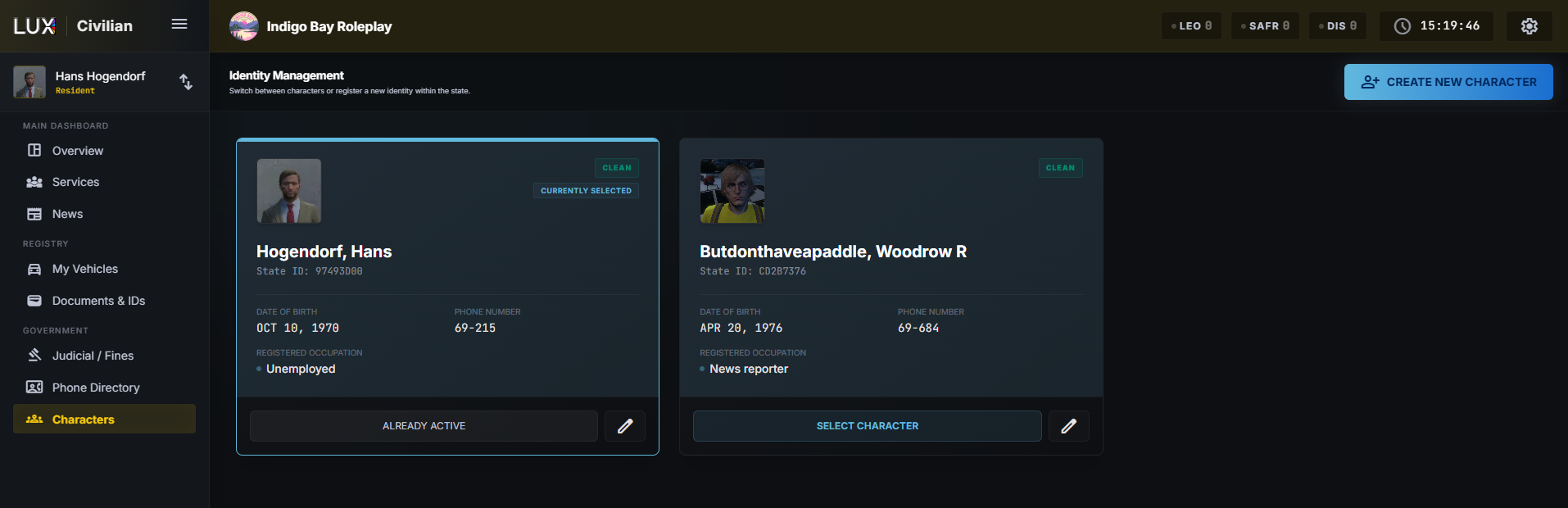
The character list
Identity Management shows one card per character:
- Photo, and a status badge — CLEAN, WARRANT or DECEASED.
- The name as Last, First Middle, so a long list stays scannable.
- State ID — the short code that identifies this person to police and medics. Officers use it to pull your file.
- Date of Birth, Phone Number and Registered Occupation.
The card you are currently playing is outlined and marked Currently Selected. SELECT CHARACTER switches to another one; the pencil opens the editor.
Creating a character
CREATE NEW CHARACTER, then fill in the identity form.
| Field | Notes |
|---|---|
| Photo | required — capture one from your in-game character, or upload an image |
| First / Middle / Last Name | middle name is optional |
| Date of Birth | drives the age on your ID |
| Gender | free text |
| Place of birth | e.g. Los Santos, SA |
| Address | where this character lives |
| Signature | drawn with the mouse; it appears on your official documents |
| Occupation | e.g. Mechanic — shows as Unemployed if left empty |
The card preview beside the form updates while you type, so you can see the State ID you are about to carry.
Save, and the character exists. Select it to start playing as them.
Editing later
The pencil on a card reopens the same form. Two things worth knowing:
- Identity and signature changes apply to every official document at once — your ID, your medical card and your licenses all re-render with the new details. That is the point: they are all issued to the same person.
- Your phone number is linked here rather than typed. See Phone Directory.
Archiving
ARCHIVE retires a character: "They will be hidden from your portal, but their records are preserved and they can be restored later."
Nothing is deleted. Reports, incidents and warrants that name them stay exactly as they were — the police record of a city cannot be erased by the person in it. Archiving is for a character you have stopped playing, not for a clean slate.
Death is separate. A character marked DECEASED stays visible, because the paperwork around them usually continues.
And it can be undone. On a character you have marked deceased, the footer shows MARK AS ALIVE where MARK DECEASED normally sits — for a misclick, or for a character brought back in the story. Only one of the two buttons is ever there.
Two things it deliberately leaves alone:
- Warrants. A death does not lift a warrant and a revival does not create one. A character with something still open reads Deceased while marked dead and goes back to reading Warrant afterwards — the warrant status is worked out live from the warrants themselves, not stored on the character.
- Their ID card. It looks the same either way. That is on purpose: whether an ID belongs to someone deceased is for an officer to find in the record, not something the card announces to whoever is carrying it.
Importing from another CAD
If your community has opened the migration window, the header also carries IMPORT FROM SONORAN or IMPORT FROM IMPERIAL, which brings your existing characters across instead of retyping them. The buttons only appear while that window is open — ask your community's staff if you expected one and it is not there.