LEO
Incidents & Creating Calls
An incident is one event the city is dealing with: a 911 call, a 311 report, a traffic stop, something you came across yourself. It is what units attach to, what the log is written against, and what a report is later built from.
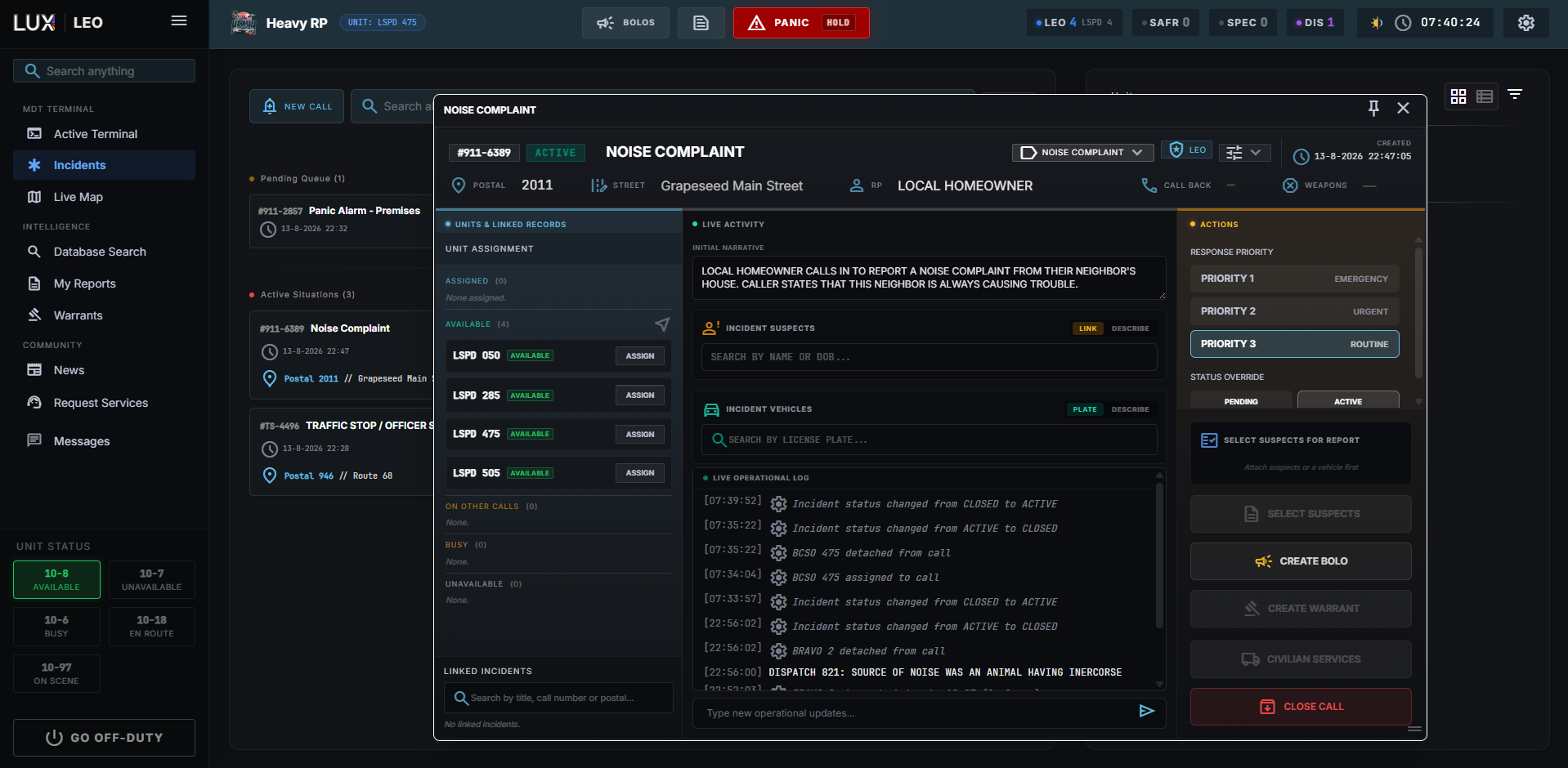
The incidents console
Three sections, and the names mean exactly what they say:
| Pending | reported, nobody assigned yet |
| Active | someone is on it |
| Closed | finished |
The list updates live — a call coming in appears without a refresh, and a status change moves the card while you are looking at it.
Getting on a call
ASSIGN UNIT on a card puts a unit on the incident. Assign yourself and the Active Terminal switches to that incident: you get the details, the other units on it, the suspects and vehicles, and the operational log.
Your status follows: attaching sets you en route, arriving sets you on scene. Detaching puts you back to available and returns the terminal to standby.
Creating a call yourself
Not everything comes through dispatch. CREATE CALL on the Active Terminal files something you found yourself, and you are attached to it straight away.
Fill in the title, the priority, the incident type, and the location — postal and street. The postal is the field that matters most: it is what puts the call on everyone's map, and a call without one is a call nobody can drive to.
A traffic stop makes its own incident; you do not create that by hand. See Traffic Stops.
Without opening the MDT: /cg
/cg files the same call from the game, without you touching the tablet.
Two forms, and the title is the only difference between them:
| You type | The call is titled |
|---|---|
/cg Fight outside the club | Fight outside the club |
/cg | Self-initiated call + your callsign |
Everything else is identical either way, and is filled in from where you are standing and who you are signed on as:
- Priority 2, and the type is left untyped — a dispatcher retypes it from the incident card, or you do it later from the MDT.
- The postal and street come from your position, and the call is routed to your own service.
- You are attached and set on scene, exactly as with a traffic stop.
- The card blinks for ten seconds in the dispatch queue.
Use the bare form when your hands are full — a call with your callsign on it and nothing else still tells dispatch where you are and that you are on something. A title is worth the two seconds it costs, because until someone opens the call it is all anyone has to go on.
Anything that needs a caller, a callback number or a deliberate priority belongs in CREATE CALL instead.
/cg only works while you are signed on and available — a unit on 10-7 gets a
message in chat and nothing is filed.
Inside an incident
- Units — who is on it, with their status.
- Involved parties and vehicles — searched from the database and attached, or typed in by hand when the person or plate is not on file.
- The operational log — the running account of what happened, with system entries for what the CAD did (units attaching, statuses changing) alongside what people write.
The log is the thing that makes the report writable afterwards. A call worked without a word in the log leaves you reconstructing it from memory an hour later.
Everyone on the call gets a role — suspect, victim, witness, other involved — and it is worth setting it right here rather than on the report. The role travels with the person into any report written from this call, it decides how they are listed on the printed sheet, and on some report types it decides whether that person gets to see the report in their own civilian portal. The role names are your community's; the meanings are explained in Reports & Charges.
That middle column has a second view: Inquiries, where you ask the public about this incident and read the answers without learning who gave them. See Inquiries — Asking the Public.
From incident to report
Tick the people an incident needs paperwork for and start a report from there. They come across with the role you gave them here.
Two things behave differently, and the difference matters:
- The report's title is a copy. It is prefilled from the incident's title and is yours to change; renaming the incident afterwards does not rewrite the report.
- The log stays live. A report reads the incident as it stands right now, including entries added after you filed — so an update from the scene reaches the case file without anyone redoing the paperwork.
Anyone added to this incident after the report exists shows up there as a suggestion, waiting for someone to confirm or dismiss them. Full detail in Reports & Charges.
Closing
Closing an incident takes it off the active board. It stays searchable, it stays attached to any report built from it, and it stays in the record of everyone who was on it — closing is not deleting.