LEO
LEO MDT Overview
The MDT is the terminal in your patrol car: the calls you are on, the units around you, the records you can pull, and the paperwork you file. It opens once you are signed on as a unit — see Going On Duty.
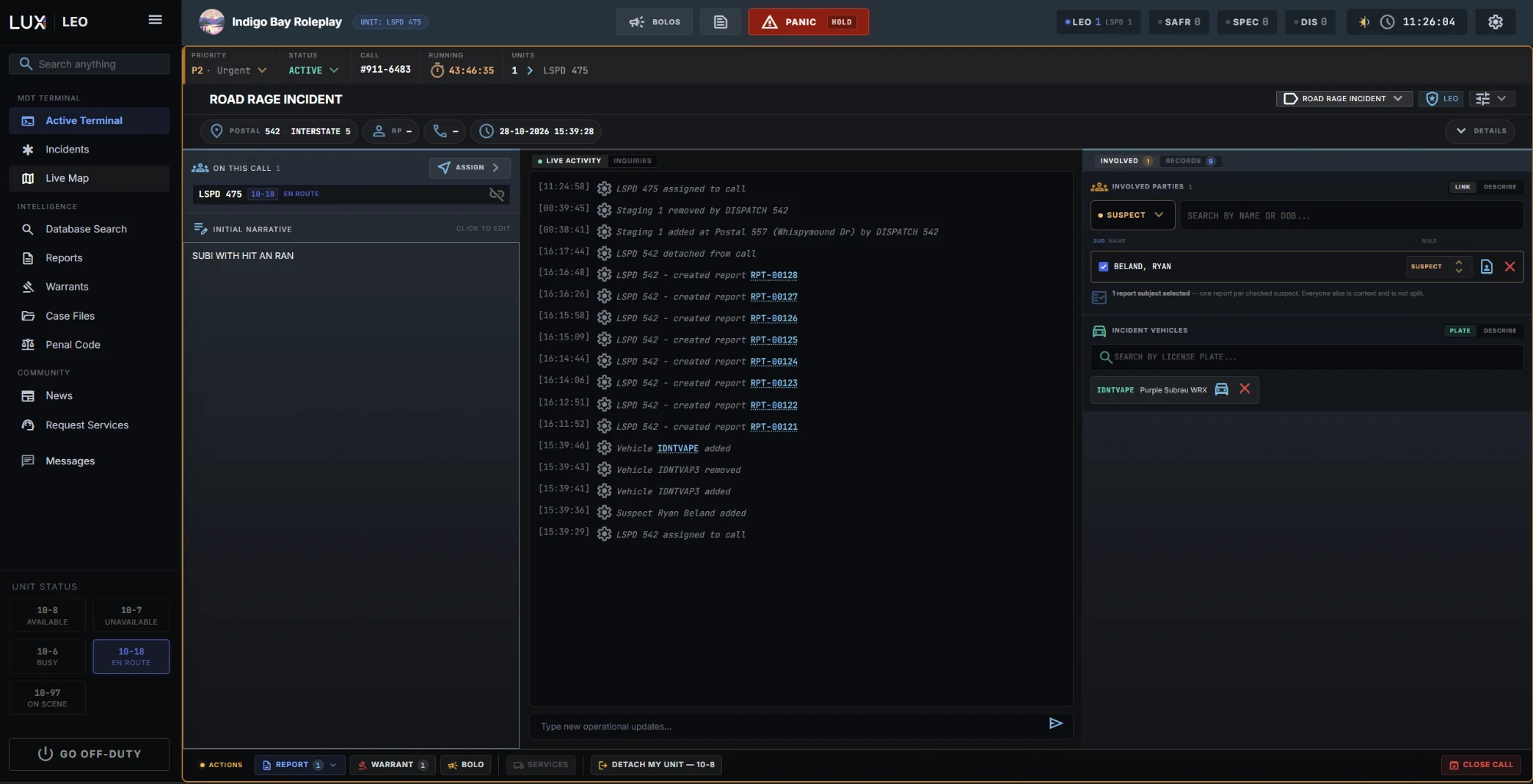
The sidebar
| Group | Pages |
|---|---|
| MDT Terminal | Active Terminal · Incidents · Live Map |
| Intelligence | Database Search · Case Files · Reports · Warrants |
| Community | News · Request Services |
Underneath sits Messages — unit-to-unit messaging, with a red badge when something is unread. See Radio & Messaging.
At the very bottom are your 10-code status buttons and GO OFF-DUTY. The header button collapses the sidebar to icons.
The Active Terminal
/leo is your home screen, and it has two faces.
Not on a call, it shows the Attached Call Interface — empty, reading "NO CALL ASSIGNED TO UNIT // STANDING BY" — with a CREATE CALL button above it, and the live list of active units beside it. That unit list is the same fleet everyone sees: who is on, what their status is, what they are on.
On a call, the whole terminal becomes that incident, in three columns:
| Column | Holds |
|---|---|
| Units & linked records | who is assigned, the units you could add grouped by availability, and any linked incidents |
| Live activity | the initial narrative, the incident's suspects and vehicles, and the live operational log with a box to type updates into |
| Actions | everything you do to the call |
The actions column is the one worth knowing by heart, because it is where a call ends up going:
- Response priority — 1 emergency, 2 urgent, 3 routine.
- Status override — force the call to pending or active.
- Select suspects for report — the route into paperwork.
- Detach my unit — 10-8 — take yourself off and go available in one click.
- Create BOLO and Create warrant, both carrying the call's context across.
- Civilian services — request a tow, a mechanic, a lawyer to this call.
- Close call.
Detaching returns you to standby. See Incidents & Calls.
The topbar
- Your unit chip, next to the community name — the callsign you are signed on as, so there is never a doubt about which unit you are acting as.
- Counters — LEO (broken down per agency), SAFR, SPEC for special units, and DIS for dispatch.
- BOLO — a dropdown of everything currently out, with how long it has been running. See BOLOs.
- PANIC — hold it down to fire. It is a hold rather than a click on purpose: a panic alarm pulls every unit in the city off what they are doing, and that should not happen because you brushed a button.
- The clock, on community time.
- Settings , beside it — your own sound levels, which plate alerts reach you, and the date format on documents. Nothing here changes anything for anyone else. See ALPR & Plate Alerts.
On a narrower window the topbar sheds detail in stages — sub-counts go first, then labels, then the branding — so the panic button and the clock survive.
Panels float
Anything you open from search — a person, a vehicle, a report, a BOLO — opens as a floating window over the terminal rather than replacing it. You can pin it to the dock at the bottom and keep working. See Floating Panels.
That is the intended way to work a call: the incident stays on screen, the person you are running floats above it.