LEO
Going On Duty (Units)
Signing on turns you into a unit: a callsign on the map, a line in the fleet list, and someone dispatch can send. Until you do, the MDT stays closed.
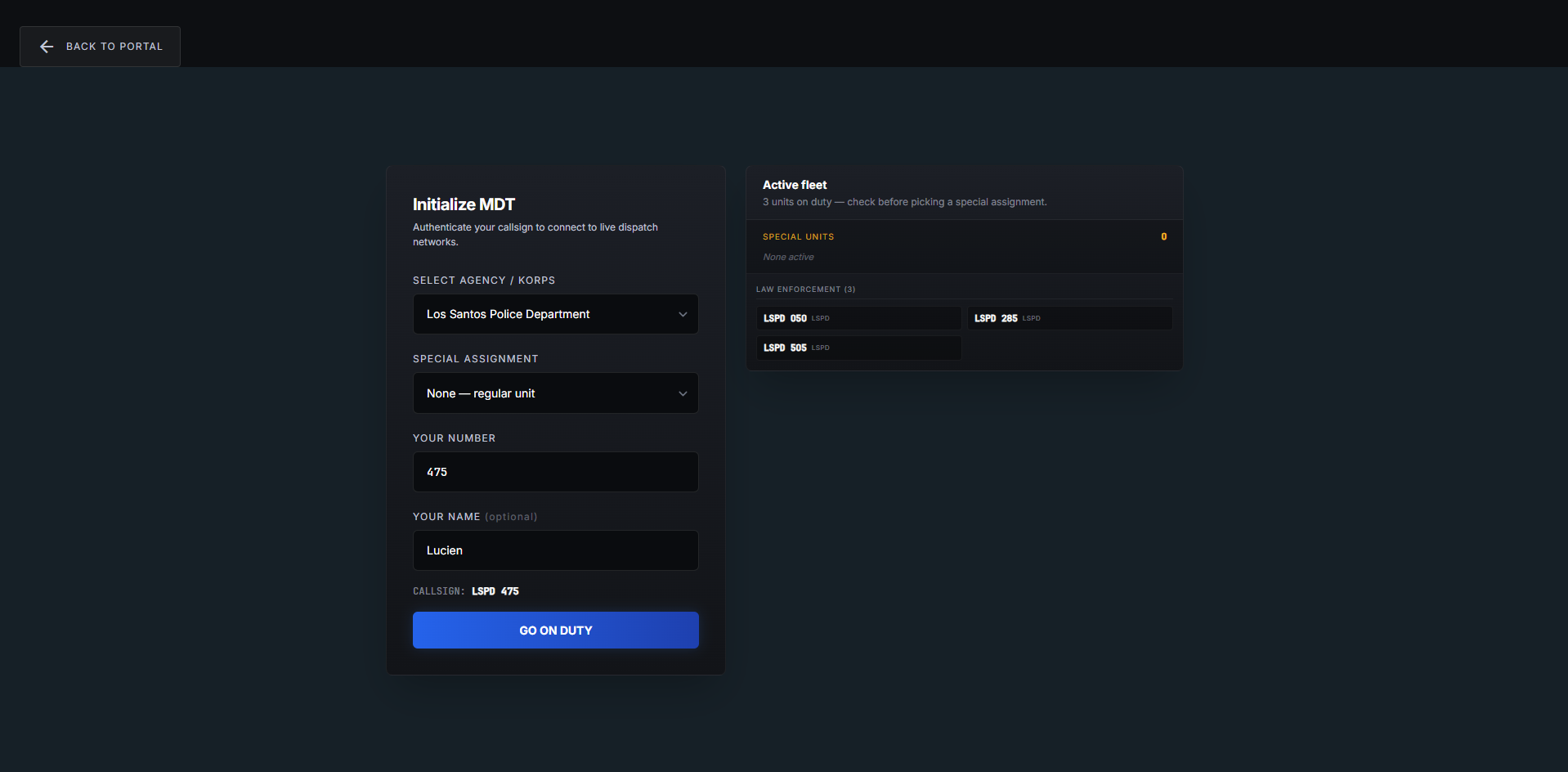
Signing on
- Select Agency / Korps — the police agency you are working for.
- Special Assignment — K9, air, detective, whatever your community runs. Leave it on None — regular unit for normal patrol.
- Your Number — e.g.
475. - Your Name — optional, e.g.
John S., so colleagues know who is behind the callsign. - GO ON DUTY.
Your callsign is built, not typed. Agency plus number gives LSPD 475. Pick
a special assignment and the prefix comes from the assignment instead, and you
fill in a Callsign Number — giving something like KILO 1. The line above
the button shows exactly what you are about to sign on as.
Check the fleet first
The Active fleet panel beside the form lists every unit on duty, grouped by department and agency, with the special units counted separately at the top.
Use it before you claim a special assignment. Three K9 units already out usually means the city needs a fourth patrol car more than a fourth dog.
One unit at a time
You cannot be two units at once. Signing on elsewhere gives you Already On Duty, with the choice to resume that unit or release it. It works across communities as well. Full detail in Going On Duty.
Your status
The 10-codes at the bottom of the sidebar are how you tell the city what you are doing — available, en route, on scene, unavailable. The exact codes and colours are set by your community.
Two of them are usually set for you rather than by you: attaching yourself to a call puts you en route, and arriving on scene — or starting a traffic stop — puts you on scene. Correct it by hand whenever reality disagrees; dispatch is looking at those colours to decide who to send.
Collapse the sidebar and the codes become a narrow rail of coloured buttons; in portrait they move to a strip under the topbar.
Going off duty
GO OFF-DUTY at the bottom of the sidebar, then confirm. You return to the portal and your callsign leaves the fleet.
You can also be signed off without pressing it — a supervisor can release your unit, and leaving the game releases an in-game one. Either way the CAD returns you to the portal instead of leaving you on a screen that no longer applies.